Unfinished things are allowed here. SerKal began in Google Sheets, became a standalone Windows application and then made the leap to Android. This development diary follows that journey through drafts, working builds, successes and changing ideas.
8 March 2025
Before SerKal became a program of its own
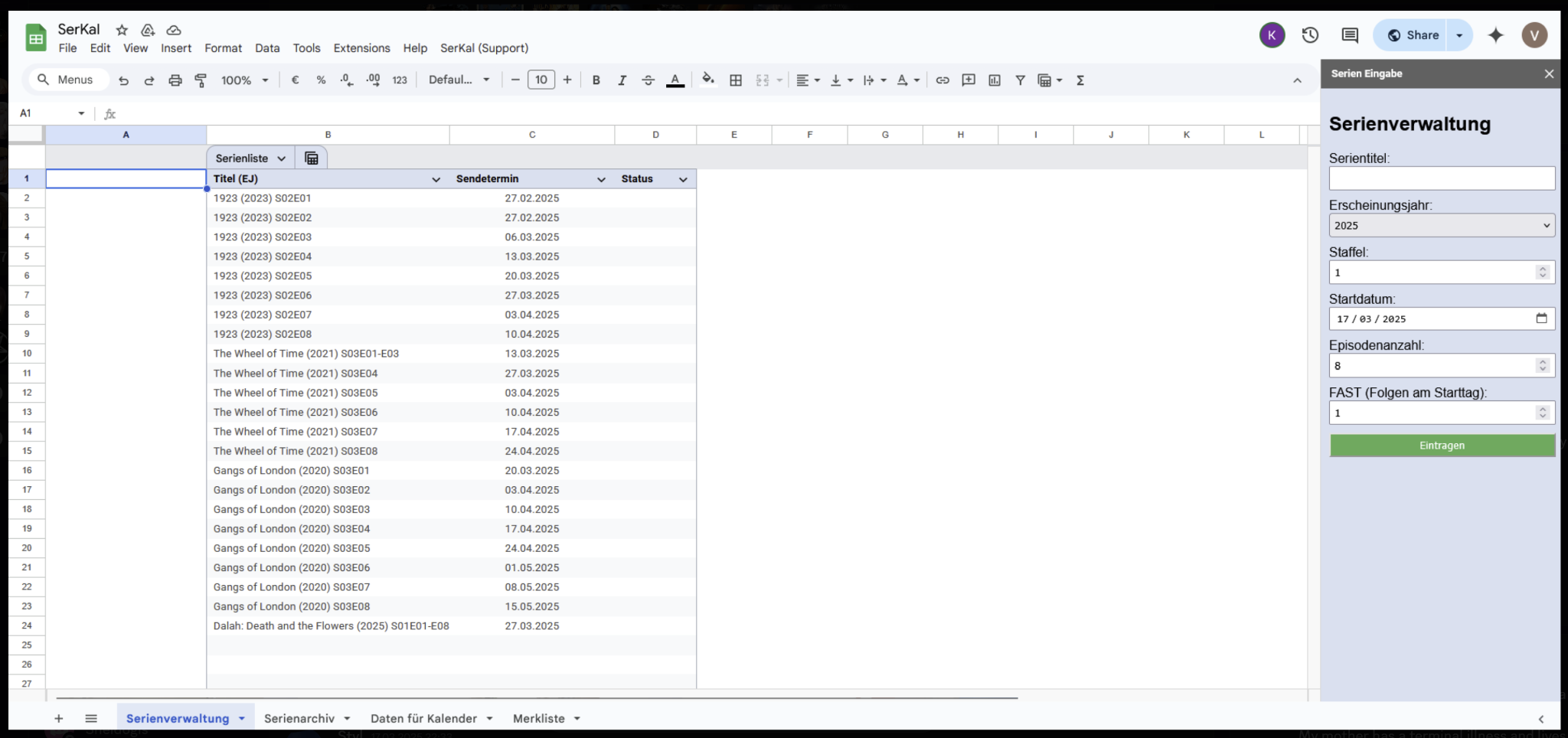
SerKal originally lived entirely in Google Sheets and Google Apps Script. Episode dates were stored in a spreadsheet, while a sidebar collected title, year, season, start date and episode count.
The starting point: series management in Google Sheets with its own entry sidebar.
Seasons and episodes already belonged together, broadcast dates were listed clearly, and the calendar stood at the centre.
This was the starting point from which SerKal Desktop – and later the Android idea – emerged.
4 August 2026
A rather big idea
What if SerKal could simply be installed? No Apps Script editor, no modules to copy and no personal web app to deploy. Download, install and start.
That question became the plan for SerKal Desktop. The existing interface and years of program logic formed the foundation.
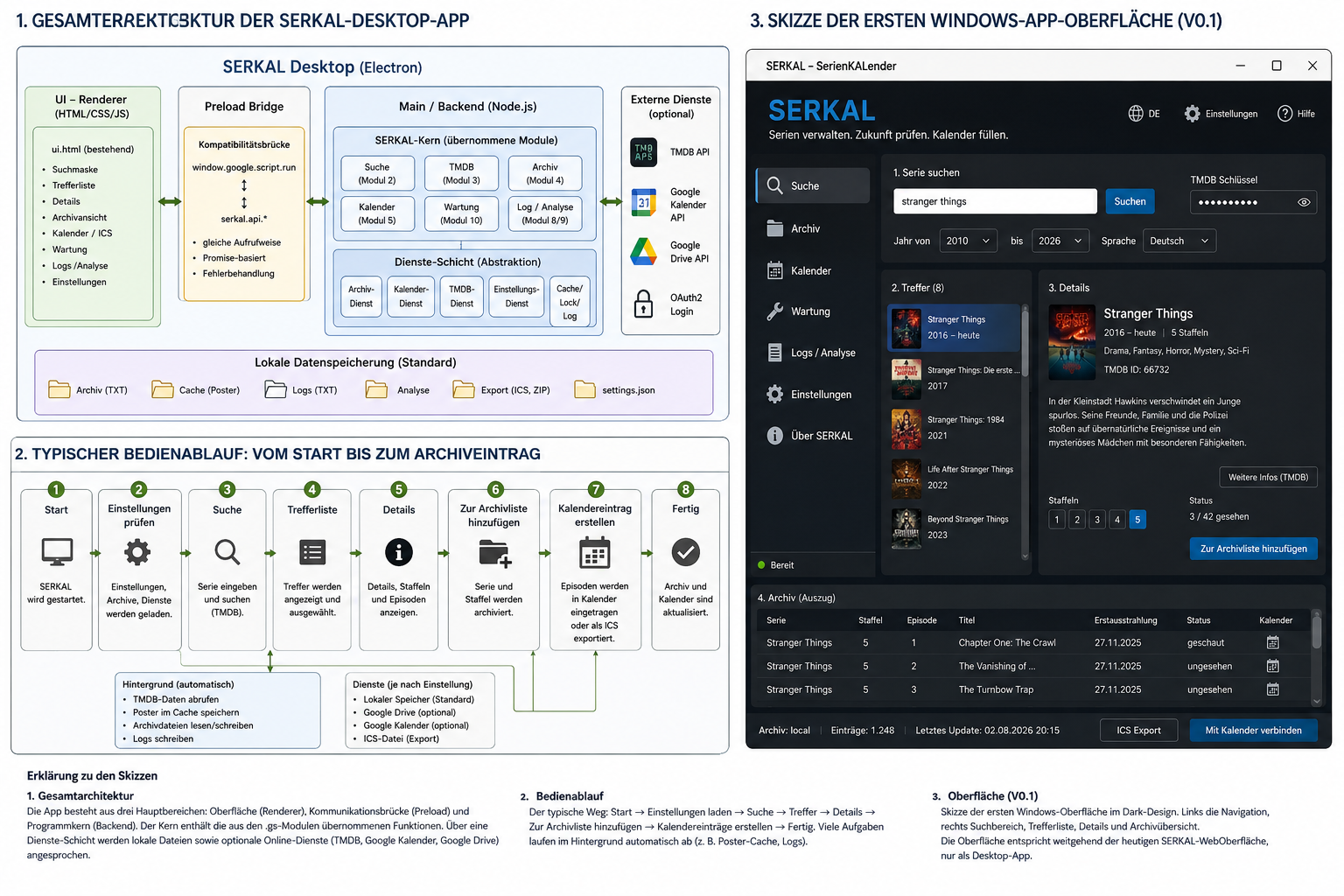
The first design sketch: architecture, workflow and a possible appearance. A target, not the finished interface.
7 August 2026
Three days later: it is alive
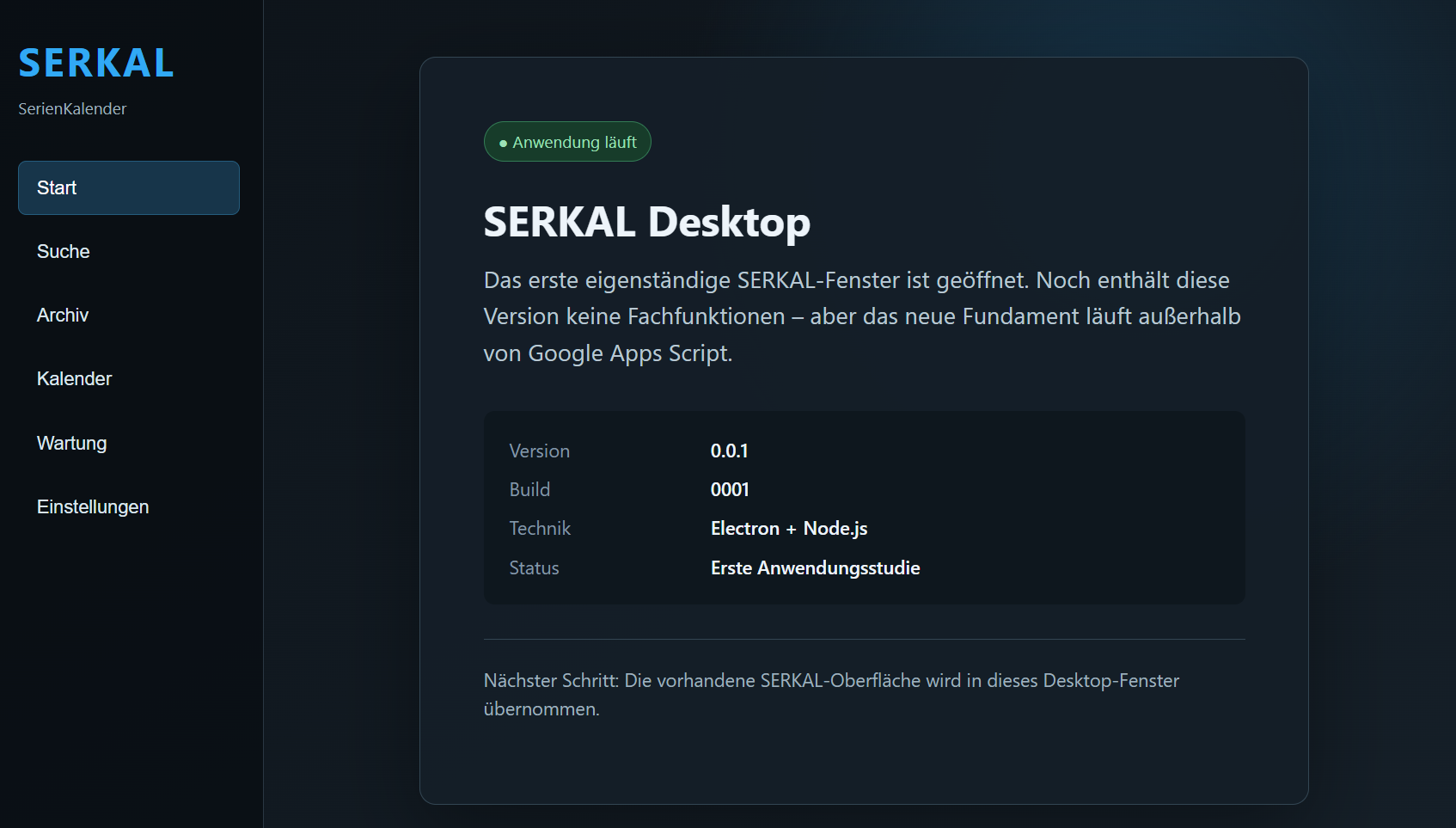
SerKal Desktop 0.0.1 – Build 0001 ran as a standalone Windows application.
The first desktop application that was actually built.
No series search, archive or calendar yet. But it ran.
Electron and Node.js formed the new foundation.
✓ Windows window✓ Electron✓ Node.js○ interface○ search○ archive○ calendar
11 August 2026
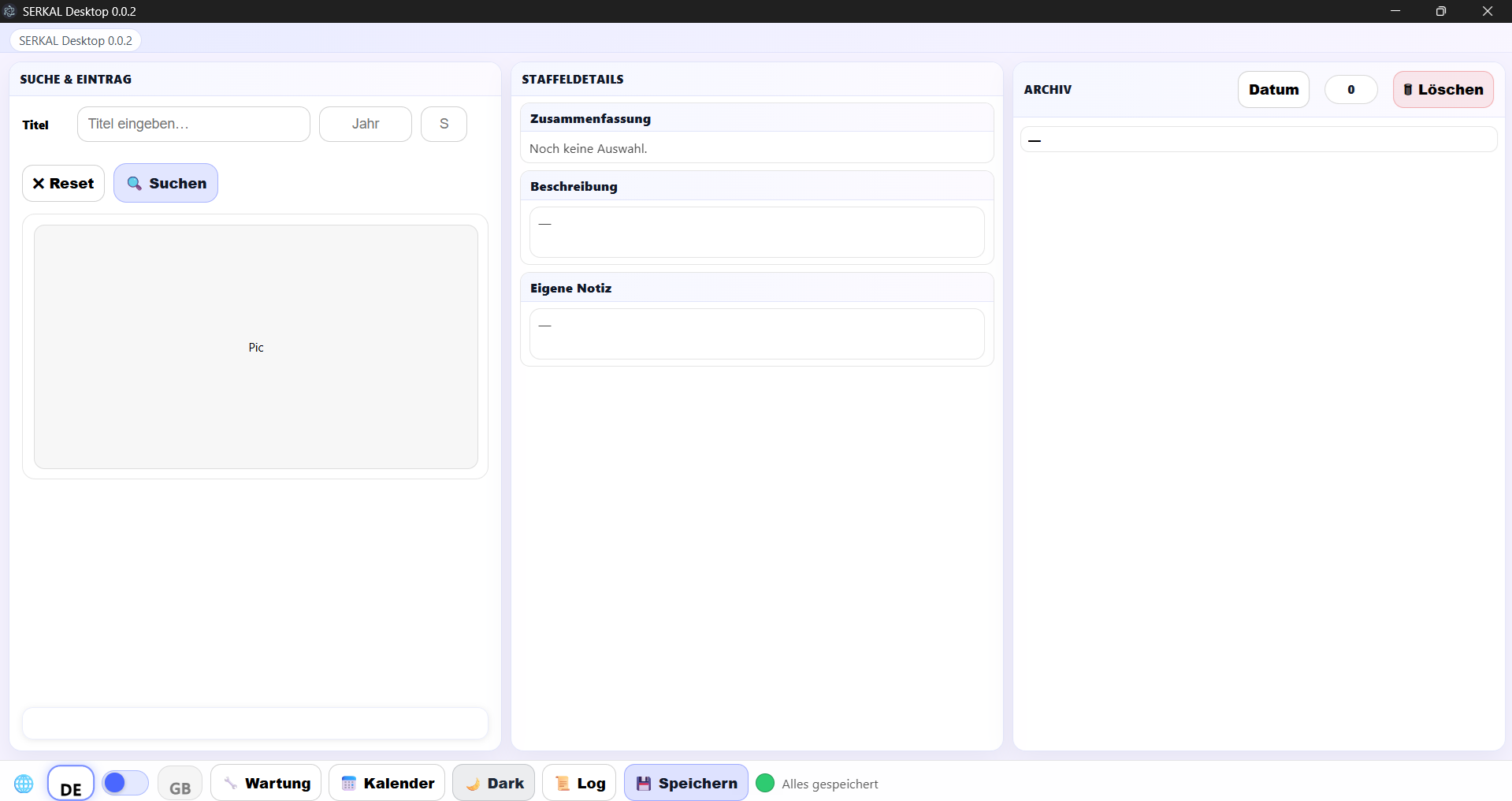
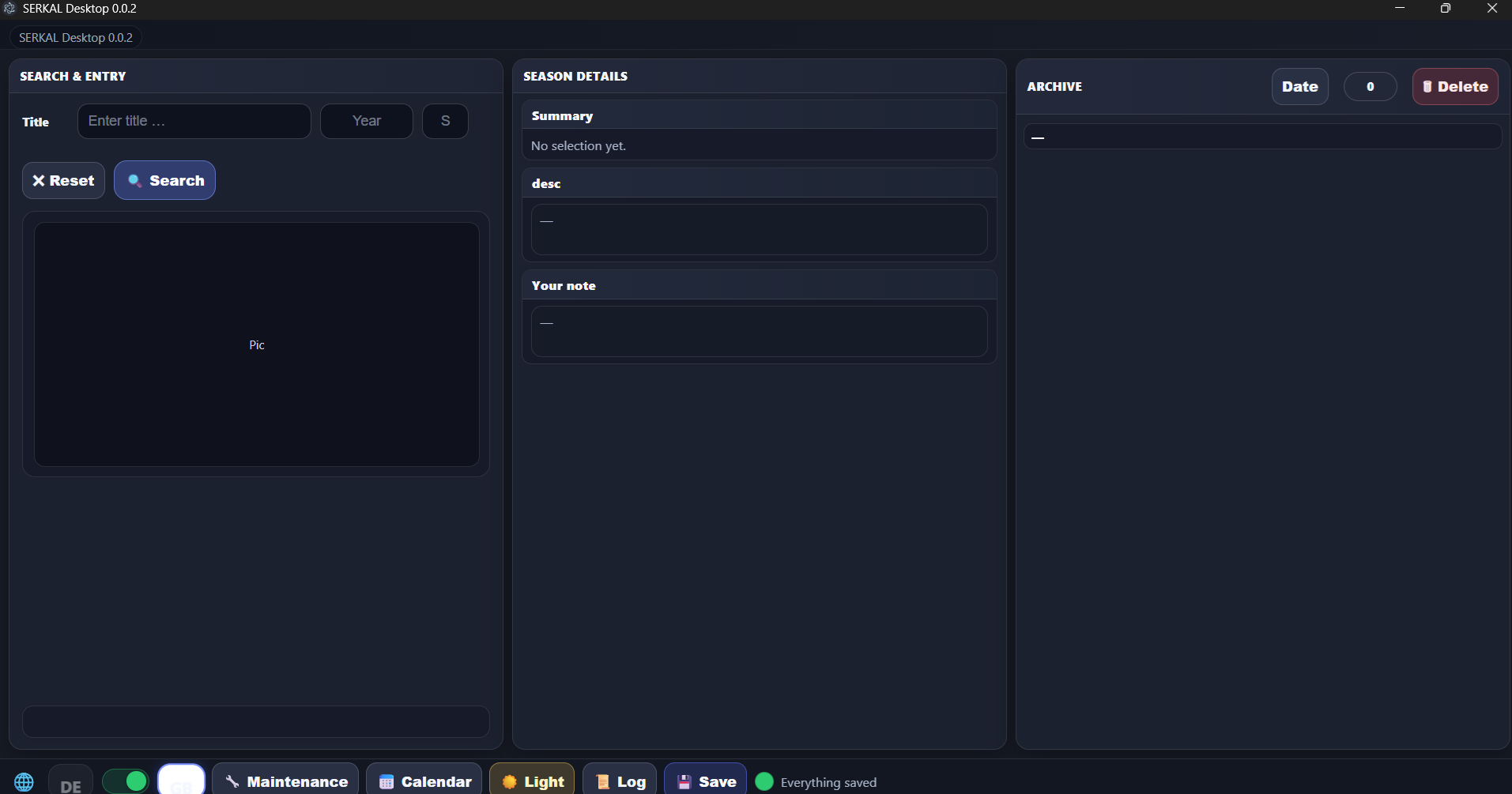
Version 0.0.2 – the interface moves in
The familiar SerKal interface moved into the Windows application. Full-screen operation, Light and Dark Mode, and switching between German and English already worked.
German interface in Light Mode.English interface in Dark Mode.
This was the first version that not only ran, but already looked recognisably like SerKal.
August 2026
Versions 0.0.3 to 0.0.5 – real data returns
The interface study became a real desktop edition. Version 0.0.5 loaded the existing archive, displayed season information, TMDB descriptions and artwork, and allowed series to be searched, added and edited.
Google Calendar – now directly
After one OAuth approval, SerKal could write episode dates straight into the selected Google Calendar. ICS remained available for other calendars.
The first complete practical test used Reacher, season 4. Every episode date appeared automatically with the correct calendar colour.
✓ search✓ archive✓ TMDB details✓ direct calendar entries✓ save and edit
All eight steps of the original desktop workflow had now been implemented.
September 2026
The workshop becomes SerKal Desktop 1.0
After many intermediate builds, release candidates and tests on several computers, SerKal Desktop 1.0 was released. Its technical version was 1.0.5, displayed as Build 1.0005.
The empty Electron window had become an installable Windows program with guided setup, TMDB search, an archive and calendar support.
✓ Windows installer✓ German and English✓ TMDB search✓ series archive✓ Google Calendar✓ ICS alternative
In roughly a year and a half, a Google Sheet had become a standalone desktop application.
September 2026
The next beginning: SerKal on Android
A first APK launched on a Google Pixel 8 and a Samsung tablet. The prototype already switched between German and English, but the desktop interface had to be reshaped for smaller screens, safe edges and landscape use.
✓ first APK✓ Pixel 8✓ Samsung tablet✓ German/English○ scalable interface○ desktop feature set
The first prototype ran – the Android story had begun.
26 October 2026
SerKal 1.2: Android becomes public
SerKal 1.2 was released for Windows and Android. Both editions could share the same archive; changes were saved safely on the device and then synchronised with Google in the background.
Search became smarter, maintenance gained a result list, announced seasons could remain without invented episode dates, streaming providers could be shown by country, and users could choose the authoritative archive when copies disagreed.
Android grows up
The Android interface used available space more effectively. Its compact footer included language, Light/Dark, calendar, help and a genuine Exit action.
✓ Desktop 1.2✓ public Android APK✓ shared archive✓ Windows and Android✓ Light and Dark Mode✓ verified signatures
The cautious September prototype became part of one shared public SerKal release.
From 1.2.0 to Desktop 1.2.6: Calendar work that can handle large jobs
The first public 1.2 release completed the major platform transition. Everyday use then showed where the next workshop effort was needed: not new buttons, but resilient Calendar processing and a clearer Google sign-in experience.
Versions 1.2.1 through 1.2.4 learned to touch only affected series and seasons, avoid rewriting completed scopes and distinguish archive storage from unfinished Calendar work. Small edits therefore stopped causing hundreds of unnecessary Google operations. Logs became more precise without exposing private Calendar content.
Desktop 1.2.5: Room for large Calendar runs
Large updates now pause after every 20 successful writes. Temporary Google limits trigger longer retries with a visible countdown, and Calendar work has its own time allowance instead of failing at the former general 45-second boundary. Completed work is retained; a later attempt continues with the remaining tasks.
Desktop 1.2.6: A separate window for Google
Sign-in now opens in a separate, normally sized external browser window without reshaping an existing browser window. When it finishes, SerKal returns and reports the real archive count. The practical acceptance run correctly showed 92 entries instead of the former “undefined entries” message.
✓ Desktop 1.2.6 released✓ Android 1.2.4 remains compatible✓ archive revision 38✓ more resilient large Calendar runs✓ separate Google window✓ real archive count
Windows 1.2.6 is now public. Android deliberately remains at 1.2.4 – a shared archive, but currently not the same product version.
Still remembered: The Google window may cover the smaller SerKal message; moving it briefly aside is enough when needed. A better window arrangement, a permanently visible genuine Google status and the known “Add calendar” browser detour remain for a later Desktop release.
SerKal has grown from a Windows sketch into a program for several devices. New workshop reports will follow when the next solid milestone has genuinely been reached.